Documentation Index
Fetch the complete documentation index at: https://deepline.com/docs/llms.txt
Use this file to discover all available pages before exploring further.
Waterfall Enrichment
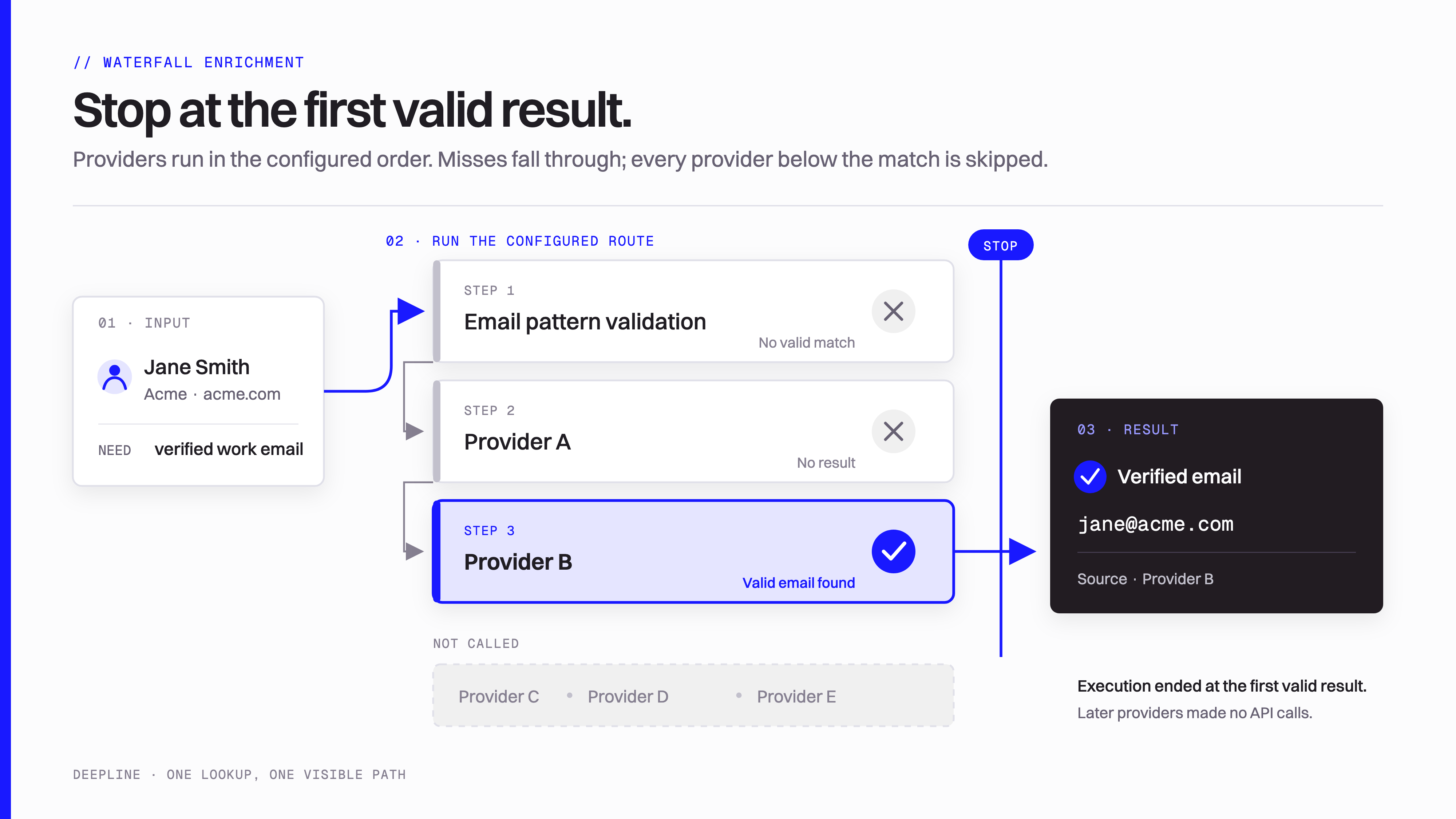
Waterfall enrichment tries multiple data providers in sequence, cheapest first, and stops the moment one returns a valid result. Deepline ships 6 waterfall plays that orchestrate 29 production providers into cost-ordered chains. Single-provider lookups typically find 40-60% of emails. Waterfall enrichment pushes that to 70-85% by cross-referencing multiple sources in a single request. You pay only for the provider that delivers. BYOK mode: misses cost nothing through Deepline. Managed mode: misses pass through provider per-call costs (typically 0.3-1.2 credits).Primitives
These are the hard numbers. Everything below is derived from them.| Attribute | Value |
|---|---|
| Waterfall plays available | 6 |
| Default email waterfall providers | 6 (Dropleads, Hunter, LeadMagic, Deepline Native, Crustdata, PeopleDataLabs) |
| Cost-aware waterfall steps | 8 (3 pattern-guess + 5 finder providers) |
| Production providers in platform | 29 |
| Cost per email find | 0.2-0.6 credits ($0.016-$0.048) |
| Cost for misses | BYOK: 0 credits. Managed: provider per-call costs (typically 0.3-1.2 credits across the chain) |
| Single-provider email coverage | 40-60% typical (based on internal testing across US B2B contacts) |
| Waterfall email coverage | 70-85% typical (based on internal testing across US B2B contacts) |
| Waterfall logic | Sequential, cost-ordered, stop-on-first-valid-hit |
| BYOK mode | Supported — bring your own API keys, pay providers directly at their rates |
What waterfall enrichment means for your GTM workflow
Not every workflow needs waterfall enrichment. Here is where it helps and where it does not.- Maximizes email coverage. A single email provider typically resolves 40-60% of lookups in our internal testing on US B2B contacts. B2B contact data decays at roughly 22.5% per year (HubSpot via Cognism), so any single source goes stale fast. The 6-provider waterfall cross-references Dropleads, Hunter, LeadMagic, Deepline Native, Crustdata, and PeopleDataLabs in real time, pushing coverage to 70-85% in the same tests. That gap translates directly to more contacts reached per campaign. According to industry benchmarks, waterfall enrichment can improve email coverage by 20-40% compared to any single provider (Instantly).
-
Cheapest path to a valid result. Waterfall logic tries the cheapest provider first (Dropleads at 0.3 credits) and stops the moment a valid email is found. Most lookups resolve on the first or second provider at 0.2-0.6 credits ($0.016-$0.048). Providers that do not fire are not billed. The cost-aware variant goes further: it tries 3 deterministic email patterns via validation (near-zero cost) before calling any finder provider. On lists where common patterns like
first.last@domain.comare prevalent, this saves 50-70% compared to starting with a paid finder. - Runs from a single prompt or CLI command. Every waterfall play is callable with a single CLI command or a natural language prompt in Claude Code or Codex. No spreadsheet UI, no column wiring, no template configuration. The agent reads your CSV headers, selects the right waterfall variant, and enriches every row. The entire loop — from input analysis to provider selection to result extraction — runs inside your IDE or terminal. This makes waterfall enrichment composable with other automation steps: scraping, scoring, CRM sync, outreach sequencing.
- Skip it for single-provider queries. If you need data from one specific provider (for example, only Apollo people search results, or only Crustdata company data), use a direct tool call instead of a waterfall. Waterfalls are designed for outcome-based queries (“find this person’s email”) where the source does not matter — only the result. For provider-specific queries, Deepline exposes all 29 providers as individual tools with their own endpoints and schemas.
How it works
The waterfall execution model is the same across all 6 plays. Here is the step-by-step sequence for a typical email lookup.-
Analyze input data. Deepline inspects your payload fields or CSV column headers to determine which waterfall variant fits. If you provide
first_name,last_name, anddomain, it selects thename_and_domain_to_email_waterfall. If you provide alinkedin_url, it selects the LinkedIn-optimizedperson_linkedin_to_email_waterfall. -
Compile the provider chain. The selected play compiles into an ordered list of provider steps. Each step specifies the tool ID, the payload template (with
{{variable}}interpolation from your input), and an extraction function that pulls the target field from the provider response. The chain is ordered by cost: cheapest providers run first. - Execute the first provider. Deepline sends the request to the lowest-cost provider in the chain (for example, Dropleads at 0.3 credits for the default email waterfall). The provider returns either a result or a miss. Execution time per provider is typically 1-3 seconds.
-
Validate the result. If the provider returns data, Deepline runs the extraction function to pull the target field (such as
email). For email waterfalls, this includes checking that the returned address is not a catch-all, not a bounce, and not syntactically invalid. The cost-aware variant usesleadmagic_email_validationto verify pattern-guessed addresses against the mail server before accepting them. - Fall through or stop. If validation fails or the provider returned no data, Deepline moves to the next provider in the chain. If validation passes, the waterfall stops immediately. You are billed only for providers that actually executed — providers below the stopping point never fire. In the default 6-provider chain, most lookups stop at provider 1 or 2.
- Return structured output. The final result includes the found value (email, person context, or contact list depending on the play), the provider that resolved it, the number of providers attempted, and the total credits consumed. This output feeds directly into downstream enrichment steps, CSV columns, or CRM updates.
Waterfall plays available
Deepline ships 6 waterfall plays. Each play is optimized for a different input shape and output goal.1. Name + Domain to Email (name_and_domain_to_email_waterfall)
The most common waterfall, with built-in cost-aware pattern guessing. Input: first_name, last_name, domain. Optional: company_name, linkedin_url. Steps: 3 deterministic pattern guesses validated via leadmagic_email_validation (patterns: first.last@domain, firstlast@domain, first_last@domain) followed by 5 finder providers (Dropleads, Hunter, LeadMagic, Deepline Native, PeopleDataLabs). If the correct pattern matches, the lookup resolves for 0.1-0.2 credits. Typical cost: 0.1-0.4 credits.
2. LinkedIn to Email (person_linkedin_to_email_waterfall)
Input: linkedin_url, first_name, last_name. Optional: domain, company_name. Provider chain: Dropleads, Hunter, LeadMagic, Deepline Native, Crustdata, PeopleDataLabs (6 providers). All providers receive the LinkedIn URL, improving match rates for LinkedIn-sourced leads. Typical cost: 0.3-0.4 credits.
3. Personal Email (personal_email_waterfall)
Find consumer (non-work) email addresses for ad targeting and direct outreach. Input: linkedin_url or first_name + last_name + domain. Provider chain: Dropleads, LeadMagic, PeopleDataLabs. Use for LinkedIn Matched Audiences, Facebook Custom Audiences, or compliant direct outreach. Typical cost: 0.3-0.5 credits.
4. Name to LinkedIn URL (name_to_linkedin_url_waterfall)
Resolve LinkedIn profile URLs from name and company information. Input: first_name, last_name, company_name or domain. Combines web search, provider databases, and identity validation. Useful when you need LinkedIn URLs as input to email or phone waterfalls.
5. Contact to Phone (contact_to_phone_waterfall)
Find mobile phone numbers for a known contact. Input: name + LinkedIn URL or work email. Provider chain spans LeadMagic, Dropleads, and other phone-capable providers with region-aware routing.
6. Company + Role to Contacts (company_to_contact_by_role_waterfall)
Prospecting waterfall. Input: company_name, domain, roles (job titles), seniority (level filter). Provider chain: Dropleads, Apollo, Icypeas, Prospeo, Crustdata (5 providers). Returns a list of matching contacts (not a single email). Use when you need to find decision makers at target accounts by title and seniority. Typical cost: 0.2-0.6 credits per provider step. Supports a limit parameter (1-100) to control how many contacts each provider returns.
Example CLI commands
Single email lookup
Bulk CSV enrichment
LinkedIn URL to email
Find decision makers at a company
Personal email lookup
Natural language (Claude Code or Codex)
You do not need to memorize tool IDs. Ask in plain language:Pilot mode (test before full run)
Always test on a small subset before running a full list:--rows 0:2 to the deepline enrich command.
Frequently Asked Questions
How much does waterfall enrichment cost per email?
Most lookups resolve on the first or second provider at 0.2-0.6 credits ($0.016-$0.048). The
name_and_domain_to_email_waterfall tries 3 free email pattern guesses first and can resolve for as little as 0.1 credits ($0.008). Worst case if all providers fire: up to ~5.9 credits for name_and_domain_to_email_waterfall or ~7.2 credits for person_linkedin_to_email_waterfall, but this is rare — it means every provider missed or returned invalid data. In BYOK mode (bring your own API keys), waterfall lookups are free through Deepline; you pay providers directly at their rates.How does Deepline choose which waterfall variant to use?
How does Deepline choose which waterfall variant to use?
Deepline inspects your input fields (payload keys or CSV column headers) and selects the variant that matches your available data. If you have
first_name, last_name, and domain, it uses name_and_domain_to_email_waterfall (which tries free patterns first). If you have linkedin_url, it prefers person_linkedin_to_email_waterfall. You can also specify the exact waterfall by tool ID in the CLI if you want to override automatic selection.What happens when no provider finds an email?
What happens when no provider finds an email?
The waterfall tries every provider in the chain. If none returns a valid result, the output is null for that row. BYOK mode: misses cost nothing through Deepline. Managed mode: misses pass through provider per-call costs (typically 0.3-1.2 credits across the chain). Deepline does not fabricate results. A null result means the contact could not be resolved from any of the 29 production providers in the platform.
Can I customize the provider order or exclude providers?
The built-in waterfall plays use a fixed cost-ordered provider chain that is optimized for price-performance. If you need a custom chain, you can break the waterfall into individual tool calls and orchestrate them yourself using
deepline tools execute or deepline enrich with multiple --with steps. You can also use the plays API (/api/v2/plays/compile) to inspect the compiled provider chain for any play and modify it programmatically.Related pages: Email Waterfall | Find Work Email | Plays Overview | Find Decision Makers | Quick Start