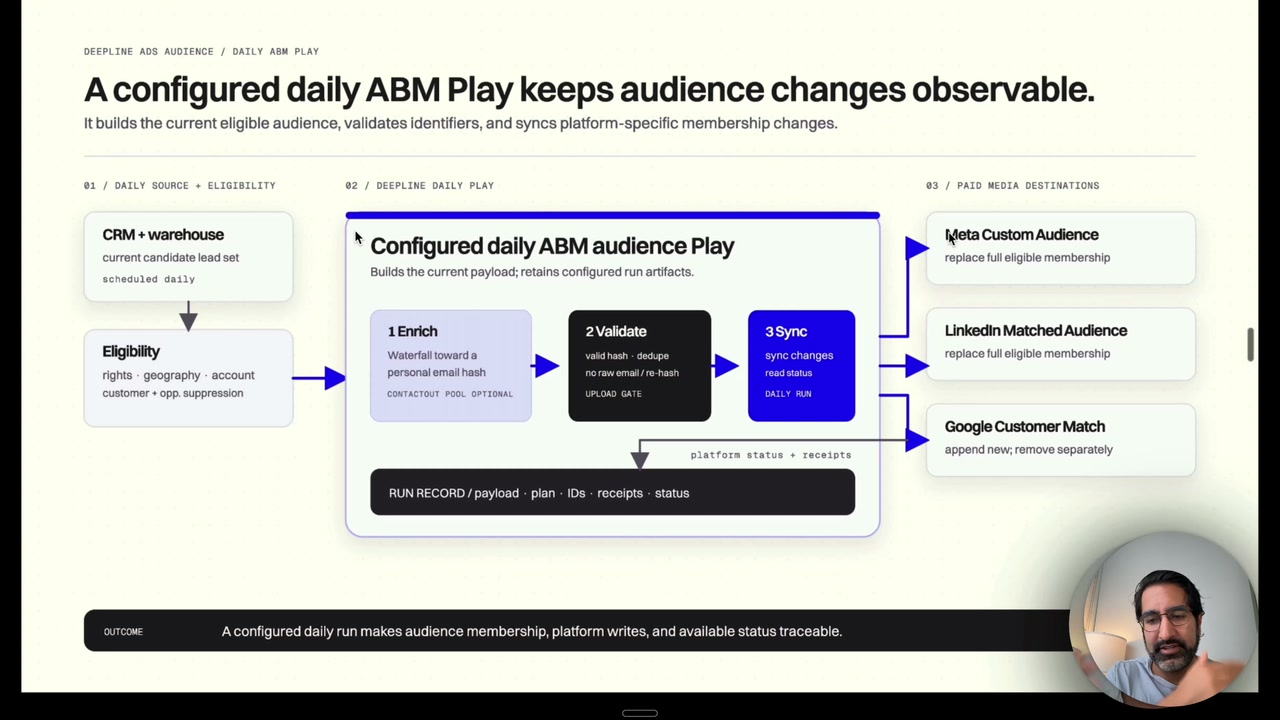
Video not loading in LinkedIn or your in-app browser? Watch it on YouTube.
This walkthrough shows the whole daily loop: choose the eligible people, enrich and validate their identifiers, then write the right membership changes to each ad platform with a record of what happened.
How matching works
Start here: how a platform decides two records are the same person
Skip this section if you already run customer-list audiences. If you have not, it explains everything else on this page.
When you upload a customer list to Meta or Google, you are not buying an audience. You are asking a question: which of these people already have an account here?
The platform takes each row in your file and looks for an account that matches it. When it finds one, that person becomes reachable with your ads. When it does not, the row reaches nobody, and any money you spent enriching it is gone.
So one thing decides whether the upload works: does your list contain an identifier the platform can recognize?
This is where B2B teams get surprised. Your CRM is full of work emails. Very few people register a personal social account with their work address. They use a personal address, and often a mobile number. You hold one identifier, the platform holds another, and the same human being sits on both sides without ever being connected.
The usual diagnosis is that the list is too small, when the real constraint is that it is keyed on an identifier the platform never collected.
The whole workflow in seven steps
Everything below is a detail inside one of these steps.
| Step | What happens | What you end up with |
|---|---|---|
| 1. Export | Pull the contacts you want to advertise to out of your CRM | A CSV, mostly work emails and names |
| 2. Decide the mode | Cheap first pass, or maximum coverage. This sets how much you spend | A budget and a stopping rule |
| 3. Enrich | Find personal emails or phones for people who only have a work email | More rows carrying an identifier a platform might recognise |
| 4. Normalize and hash | Put every identifier in one exact format, then convert it to a 64-character code | A file of codes, no readable addresses |
| 5. Audit | Check nothing was hashed twice and no malformed rows are present | Confidence the upload is not silently broken |
| 6. Upload | Create the audience in Meta or Google and send the rows | An audience the platform is processing |
| 7. Read back | Wait for processing, then compare matched people against your baseline | A number you can judge the spend against |
Steps 4 and 5 are where uploads silently fail, and step 3 is where the money goes. Those get the most attention below.
A tool can run all seven for you. Understanding them still matters, because you are the one deciding when to stop spending in step 3.
Hashing
What a hash is, starting from zero
You will see the word "hash" everywhere in this workflow. It sounds like encryption or security jargon. It is simpler than that, and understanding it makes every other decision on this page obvious.
A hash is a fixed-length code generated from a piece of text.
SHA-256 is one specific recipe for generating that code. You feed it any text and it returns 64 characters. Here is the same email address, before and after:
jane@corp.com
a2327573224b6c023cc60a440a85830a8894f467ea13f33f36290059e2e8193f
Three properties make this useful, and each one does real work:
1. The same input always produces the same output. Hash jane@corp.com on your laptop today and on a server in a year, and you get those identical 64 characters. This is what makes matching possible at all. If the output changed, nothing could ever be compared.
2. A different input produces a completely different output. Drop a single character and the result is not similar, it is unrecognisable:
jane@corp.com   a2327573224b6c023cc60a440a85830a8894f467ea13f33f36290059e2e8193f
jane@corp.co    ddb90df438b963c1ef9fb0a479b8ed2c9b2e03e82158ac23c25336ef36780607
There is no "close match" in hashing. Two hashes are either identical or they tell you nothing at all. This is why the formatting rules later on matter so much.
3. You cannot work backwards from the code to the text. The recipe throws information away as it runs. Given those 64 characters and no other information, there is no calculation that recovers jane@corp.com. This is the property people mean by "one-way," and it is why hashes are safe to hand to a third party.
Why this lets two companies compare lists without showing each other anything
You know Jane is your customer. Meta knows Jane has an account. Neither of you wants to hand the other a file of email addresses, and privacy law increasingly agrees.
Hashing solves it:
- You take
jane@corp.com, hash it, and upload the 64-character code. - Meta takes the email on Jane's account, hashes it with the same recipe.
- Meta compares the two codes. They are identical, so it is the same person.
Meta learns that one of its users is on your list. It never sees the address you hold, and you never see the address it holds. Property 1 makes the comparison work; property 3 keeps both sides private.
For the people who do not match, Meta learns nothing at all. It holds a 64-character code it cannot reverse, for a person it cannot identify.
The mental model: instead of comparing two email addresses, both sides compare two fingerprints of those addresses. Identical fingerprints mean the same person, and a fingerprint cannot be turned back into a face.
Meta requires SHA-256 specifically and does not support other hashing methods. Google asks for the same algorithm in hex form. Both sides have to use the identical recipe, or the codes will not line up.
So should you buy hashes or personal emails?
A hash is not an alternative kind of identifier, it is a personal email that has been through the recipe above. Upload a raw address and the platform hashes it on arrival, so you end up in the same place with the same match quality.
That makes the decision a question of whether you need to read the address, rather than a question about matching:
- Only running ads with it? You never need the readable address. Buy the hash. It costs a fraction of the price, because you are not paying for the ability to contact the person.
- Also emailing or calling the person? Buy the readable address and hash it yourself before upload. You need both forms.
That price gap is the entire reason hash providers exist as a category.
Buy hashes when the address is only ever going into an ad platform. Buy raw personal emails when a human or a sequence also needs to use them. The matching quality is identical.
Two rules decide whether the upload works at all
Normalize before you hash. Remember property 2: any difference in the input, however trivial to a human, produces a completely different code. A capital letter counts. A trailing space counts.
jane@corp.com    a2327573224b6c023cc60a440a85830a8894f467ea13f33f36290059e2e8193f
Jane@Corp.com    c47021eabb6076f991ea1c7b3af4d99910ab708d9e9bf58d3d10690fe7977e3c
To a person those are the same mailbox. To a hash comparison they are two unrelated strangers. So both sides have to agree on one exact spelling before hashing, and that agreed spelling is what "normalizing" means. Both platforms want whitespace trimmed and every character lowercased.
Google adds a rule almost nobody guesses. For gmail.com and googlemail.com addresses only, strip the periods from the username and drop any +suffix, so Jane.Doe+Shopping@googlemail.com normalizes to janedoe@googlemail.com. Apply that same treatment to any other domain and you will produce an address that matches nothing, because elsewhere the dots are significant.
Hash exactly once. When a provider already returned a hash and you hash it again, you get a fingerprint of a fingerprint. It matches nothing. The upload reports as successful, the audience looks populated, and it reaches no one.
Double-hashing is the most common way a technically correct upload fails silently, which is why it is worth an explicit check before every upload rather than a note in a runbook.
Two more details trip people up. The platforms do not want every column hashed: Google hashes email, phone, first name, and last name, while country and zip stay in plain text. Hashing a field that should be readable breaks it just as thoroughly as failing to hash one that should not be.
And the phone rules genuinely differ between the two platforms, which makes a single shared normalizer a bug rather than a shortcut.
| Field | Google Customer Match | Meta Custom Audiences |
|---|---|---|
| Phone format | E.164, including the leading + sign | Digits only. Strip symbols, letters and leading zeroes, then prefix the country code |
| Gmail dots and +suffix | Strip both, for gmail.com and googlemail.com only | No equivalent rule |
| Hash algorithm | SHA-256, hex | SHA-256 only, hex, lowercase for A through F |
Write the normalizer per platform. Formatting a Meta phone number the way Google wants it produces a valid-looking hash that matches nobody.
The ladder
Why enrichment runs in layers
Ask for an enriched audience and you get a plan with several layers rather than a single step. The layers exist because identifiers vary a lot in price, and you only want to pay the expensive ones for people the cheap ones could not find.
Each layer runs only on the rows still missing a usable identifier after the layer above it.
| Layer | What it does | Why it sits here |
|---|---|---|
| Baseline | Hash the work emails, plus any personal emails or phones already in your CRM | Free. You already own this data, and it doubles as your control group. |
| LinkedIn repair | Fill in missing LinkedIn profile URLs | Several hash providers take a LinkedIn URL as input, so repair has to happen before they can run. |
| Hash providers | Buy hashed personal emails directly | Cheapest route to a matchable identifier, because you are not paying to read the address. |
| Raw email providers | Buy readable personal emails, then hash them locally | Several times the cost of a hash. Worth running only on rows the hash layer missed. |
The order is a cost ladder, not a quality ladder. A hash bought in layer three matches exactly as well as an address bought in layer four. The cheap layer runs first because it is cheap.
Stop when the next layer costs more per newly reachable person than that person is worth to you.
Email or phone
Should you buy mobile numbers instead?
Mobile numbers are a legitimate second identifier, and plenty of practitioners believe they match better than personal emails.
The evidence does not support that ranking. Neither Google nor Meta publishes an identifier ranking at all. The one identity vendor that does publish one, LiveRamp, puts it the other way around and calls plaintext email the strongest single identifier, with phone plus name at the bottom of its preferred combinations.
What is well supported is a weaker and more useful claim: phone is a strong additional identifier. Meta explicitly tells you to supply multiple keys per record to raise matching. So phones are worth adding alongside email, not instead of it.
The cost side is unambiguous. Mobile numbers run considerably more per contact than hashed emails, which is why email is the default first layer.
The practical approach is to run the cheap email layers first, add phones only for a segment valuable enough to justify the price, and measure the two separately so you learn what works on your list instead of inheriting a rule of thumb from someone whose list looked nothing like yours.
Reading the result
Match rate is a ratio, so it moves for boring reasons
After upload, each platform reports how much of your list it matched, and the two report it differently. Google shows a match rate percentage. Meta shows a Match score out of ten, in half-point increments, which you add as a column in Ads Manager.
Both divide by rows uploaded. That detail matters more than it sounds: every row you upload that cannot match still counts against the denominator. Cleaning junk rows before upload is a match-rate lever, not only a cost saving.
It also means the number moves for boring reasons. Add a layer that contributes many new rows, and the denominator grows faster than the numerator, so the score can fall while the count of reachable people rises. A campaign runs on reachable people, not on a ratio.
Judge a run on the count of matched people. Keep the percentage or score as a diagnostic for whether something broke, not as the grade. Google says outright that match rate is not an indicator of list performance.
Read these together, because each fails independently:
- rows uploaded
- rows rejected as invalid
- people matched
- audience size the platform reports back
- Deepline spend for the layer
For scale, Google publishes the only official benchmark either platform offers: most advertisers land between 29% and 62%. That figure covers all advertisers and is mostly consumer lists, so read it as the number a good consumer audience hits, not as a B2B target. A work-email-only B2B list starting well below that range is the normal case, and it is the reason this workflow exists.
On minimums, Google needs 100 active users in the last 30 days before a Customer Match list can serve, for lists uploaded or refreshed after February 2024, and still recommends at least 5,000 members. Meta guides toward at least 1,000 customers per list, and separately requires 100 people in a source audience used to build a Lookalike. A 1,000-row test clears those floors only if enough of it matches, so plan for real attrition between upload and delivery.
Both platforms take time to process, up to a day or two, so an empty size shortly after upload usually means processing rather than failure.
Sizes and match figures also take time to populate. An empty size field shortly after upload usually means the platform is still processing, not that nothing matched.
Compliance gate
Check privacy and platform rules before you spend
Audience enrichment uses personal data. Treat every run as a compliance workflow before it becomes a matching workflow. This is not legal advice; it is the checklist your marketing, legal, and data teams should clear before upload.
For GDPR and UK GDPR, identify the lawful basis before processing. Consent or legitimate interest may be available for advertising, but that depends on context, expectations, opt-out handling, and the balancing test. Do not assume performance of a contract covers targeted advertising. The European Data Protection Board gives advertising as an example where that basis usually does not apply.
For Google Customer Match:
- Use customer information collected in a first-party context.
- Make sure the privacy policy discloses sharing with third parties that perform services on your behalf.
- Obtain consent where law or Google policy requires it.
- Use an approved Google upload interface or API.
- Populate consent fields where required, especially for EEA users.
- Do not upload data from children or child-directed properties.
- Do not use Customer Match to infer or target sensitive categories.
For Meta customer-list Custom Audiences:
- Use the correct ad account and accept Meta's Customer List Custom Audiences terms.
- Upload only data you are allowed to use and share for advertising.
- Normalize and hash identifiers according to the upload path.
- Avoid audience names or ads that reveal sensitive traits.
- Review Special Ad Category rules before running housing, employment, credit, political, or social-issue campaigns.
- Keep suppression lists current for opt-outs, deletions, customers, and recent converters.
The safest default is to enrich only first-party, consented, high-intent segments. When the source list is a scraped TAM, or the opt-out state is unknown, do not upload it.
Worth it?
The economics come down to deal size
Enrichment makes sense when the extra reachable people change campaign economics.
Work the arithmetic backwards from your deal size. Divide the enrichment cost by the number of newly reachable people to get a cost per reachable person, then ask whether that number is defensible against your average contract value and close rate. For a six-figure deal in a narrow buying committee, a high cost per reachable person can be easy to justify. For a low-value, high-volume motion, the same spend is usually waste.
Enrich when the list is already high intent: pipeline accounts, event attendees, product-qualified accounts, open opportunities, buying committees at target accounts, expansion pools, or suppression lists.
Skip it when you have a broad scrape with weak permissioning, when the campaign cannot measure lift, when you are enriching because the CRM ought to be complete rather than because the audience will be activated, or when the remaining gap has already failed cheap provider pilots.
The early layers are often worth scaling. The last stubborn slice of a list usually is not, and the honest move at that point is to stop rather than to run more email providers against it.
Running it
How to actually run this
You do not need to assemble this by hand. The deepline-ads-audiences skill runs the whole sequence: it discovers your ad accounts, builds the baseline, runs the enrichment layers in cost order, validates the hashes, creates the audiences, uploads the rows, and reads the status back.
deepline plays run --file .skills/deepline-ads-audiences/plays/build-hash-only-audience.play.ts \
  --input '{"file":"contacts.csv"}' --watch
Connect Google and Meta, hand it the list, and say which platforms you want. When it shows you a plan with several layers, that is the cost ladder above, and you can stop it at any layer.
Two habits make the results readable. Build the unenriched audience first and keep it, so you have a control group. Then run the audit step before upload, because it is the check that catches double-hashed values and malformed rows while they are still cheap to fix.
Start with the unenriched list. Upload it, let it match, and write the number down. Every layer after that is measured against it, and without it you cannot tell whether enrichment did anything.
Platform documentation referenced above
- Meta: Customer list Custom Audiences, normalization and hashing — Accepted identifiers, the SHA-256-only hashing requirement, and per-field normalization rules.
- Google Ads: Format your customer data file — Which fields to hash, which to leave readable, the gmail dot rule, and E.164 phone formatting.
- Google Ads: About the customer matching process — How Google normalizes and matches uploaded customer data. Note that it does not document how match rate itself is calculated.
- Google Ads: Fix Customer Match list size and volume issues — The 100 active-user minimum, applicable to lists uploaded or refreshed after February 2024.
- Google Ads: About Customer Match match rates — How Google defines match rate, and its statement that match rate is not an indicator of list performance.
- Google Ads: Customer Match best practices — The 29% to 62% range covering most advertisers. All advertisers, not a B2B benchmark.
- Meta: Create a Lookalike Audience — The 100-person minimum for a source audience, with 1,000 to 5,000 recommended.
- LiveRamp: Supported and preferred identifier combinations — The only published identifier ranking found. Ranks plaintext email as the strongest single identifier.
1What is a hashed email, and is it different from a personal email?+
A hashed email is the same address run through SHA-256, which turns it into a fixed 64-character fingerprint that cannot be reversed. It is not a different identifier. If you upload a raw email, the platform hashes it anyway. Buying the hash directly is cheaper when advertising is the only use for the address.
2Why does my B2B customer list match so poorly on Meta?+
Most B2B CRMs store work emails, and most people do not register their personal social accounts with a work address. The platform stored a personal email or a mobile number, so there is nothing to compare against. Adding personal identifiers is what raises the number of reachable people.
3Should I buy mobile numbers instead of personal emails?+
Add them alongside email rather than instead of it. Neither Google nor Meta publishes an identifier ranking, and LiveRamp, the one identity vendor that does, calls plaintext email the strongest single identifier. What is well supported is that supplying more identifiers per record raises matching. Mobile numbers also cost considerably more per contact than hashed emails, which is why email is the usual first layer.
4What is the most common mistake when uploading an audience?+
Hashing twice. If a provider already returned a hash and you hash it again, you produce a fingerprint of a fingerprint that matches nothing. The upload still reports as successful, so the failure is silent. Normalizing incorrectly fails the same quiet way, and the phone rules differ by platform: Google wants E.164 with a leading plus sign, while Meta wants digits only with symbols and leading zeroes stripped.
5How many people do I need in a list?+
Google needs 100 active users in the last 30 days before a Customer Match list can serve, for lists uploaded or refreshed after February 2024, and recommends at least 5,000. Meta guides toward at least 1,000 customers per list, and separately requires 100 people in a source audience used for a Lookalike. Plan for meaningful attrition between rows uploaded and people matched.