There are three ways to wire an agent to GTM data: a direct REST call, an MCP server, or a CLI. Deepline ships all three, and they run the same waterfall logic against the same providers.
We wrote the first version of this post in early 2026, when the token benchmarks were lopsided against MCP and we recommended the CLI for basically everyone. The benchmarks were real. They are also no longer the whole picture: Anthropic shipped context-efficiency work through late 2025, tooling caught up, and MCP got a lot cheaper to run. Deepline now ships a remote MCP server, and for agents that speak MCP it is the path we recommend.
Here is the history, what changed, and how to pick.
What the early benchmarks showed
In late March 2026, StackOne summarized ScaleKit's GitHub MCP-versus-CLI benchmark. ScaleKit's primary benchmark repository measures selected GitHub tasks under a specific model, harness, and eager-schema configuration. It does not establish a universal Deepline token multiplier. The useful lesson is narrower: interface configuration and tool-schema loading can dominate context before task work begins.
A week later, Firecrawl published its own benchmark confirming the pattern: MCP costs 4 to 32x more tokens than CLI. Same tasks, much higher bills.
Independently, Geoffrey Huntley measured the context cost of the official GitHub MCP server: roughly 55,000 tokens added to the agent's context window, before any work happens, just from the tool definitions. Adding three popular MCP servers (GitHub, Playwright, IDE integration) consumed 143,000 of a 200,000-token context window — 72% of the agent's working memory eaten by tool descriptions it mostly never touched.
The community responded by building MCP-to-CLI converters. The mcp2cli project crossed 1.9K GitHub stars by the end of April, claiming 96-99% token savings on common workflows. Atlassian published an MCP compressor that reduces tool-description overhead by 70-97% without changing how the agent calls tools.
Even Claude Code itself is structured this way. Per a public deep-dive of the Claude Code architecture, Claude Code's native tools are Read, Write, Bash, Grep, and Glob — Bash handles git, npm, and other common shell operations. MCP servers are reserved for specialized capabilities like Playwright (browser automation) where the tool surface is genuinely complex enough to justify the context cost. Not "everything is an MCP." Bash for the common case.
This was never an "MCP is bad" story. It was a snapshot of tool-definition overhead at a moment when nothing had been optimized yet. That moment passed.
What Anthropic shipped to close the gap
This is the part of the story most write-ups miss: Anthropic has been actively shipping context-efficiency tools for MCP since November 2025. Three matter:
- Code execution with MCP (November 2025): Instead of emitting JSON tool calls one at a time, Claude writes code that calls MCP tools inside a sandboxed container. The model only sees the final result. Anthropic's testing showed a 98.7% token reduction on a representative workflow — from 150,000 tokens down to 2,000.
- Tool Search Tool (November 2025): A new
defer_loading: trueflag that lets Claude discover tools on-demand instead of loading all definitions upfront. Anthropic reports an 85% token reduction, plus internal MCP-eval accuracy gains from 49% → 74% on Opus 4 and 79.5% → 88.1% on Opus 4.5. - Programmatic Tool Calling (November 2025 beta): Combines the two — tools are deferred AND invoked from code Claude writes. Anthropic's initial release reported 37% token reduction.
The catch: these features are opt-in. They live in the Anthropic SDK and require explicit tool_search or defer_loading flags. Most off-the-shelf MCP servers — including the popular GitHub, Playwright, and Slack servers — don't yet emit code-execution-friendly schemas or mark themselves deferred. The Claude Code GitHub issue requesting these betas is still open.
So the practical question hasn't fully flipped. When a developer chooses between giving an agent a CLI vs an MCP server today, the CLI still uses fewer tokens by default. The gap will close as more MCP servers adopt deferred loading and code execution — and informed teams using Anthropic's beta features can already get most of the way there. But "we ship a CLI" remains the simpler ergonomic answer for the next several quarters.
In Practice
What GTM teams are discovering in production
The benchmark data is one thing. What GTM engineers are actually doing in production is another.
At GTM Eng NYC (June 30, 2026 at Ramp HQ), practitioners from Ramp, Notion, Modal, Attention, and Deepline shared their real stacks. A consistent theme: teams that started with MCP integrations for data enrichment moved to CLI-based workflows as their agent usage scaled. The reasons matched the benchmarks — token cost and reliability.
Bryant McCombs, GTM Account Director at OpenAI, spoke at the same event about how his team uses Codex for non-engineering use cases — demonstrating that coding agents running CLI tools are no longer just for engineers. GTM professionals who can't write code are using them to enrich data, pull reports, and deploy sequences through natural-language prompts to a Bash-capable agent.
The Lenny's Podcast episode with Alexander Embiricos (OpenAI Codex product lead, December 2025) framed the dynamic this way: the bottleneck in AI-assisted workflows is not the model's capability — it's the quality and accessibility of the context the model works from. A CLI that returns clean, structured, provenance-tracked output gives the model better context than an MCP server returning raw JSON from a single provider.
For GTM, this translates directly: a Deepline CLI call returning a waterfall-enriched contact object with timestamps, confidence scores, and provider provenance is better context than an MCP call returning a raw Apollo response.
The three primitives an agent can call
Every API exposed to an AI agent has to choose how to expose itself. There are three real options.
Direct API (raw HTTP/JSON)
The agent crafts each call from scratch — auth headers, retry logic, pagination, schema mapping, error handling. This is fine for one-off ad-hoc work, but disastrous for repeated workflows. Every retry is a new reasoning step. Every pagination is a new tool call. The agent burns tokens reinventing what a library should encapsulate.
Best for: ad-hoc exploration, one-shot integrations. Worst for: any workflow the agent runs more than twice.
MCP server
A standardized protocol where the agent reads a tool catalog from a server and invokes tools by name with structured payloads. Beautiful in theory: protocol-level uniformity, consistent error semantics, no per-vendor adapter required.
The tool catalog used to be the problem. Every tool definition consumed context tokens on every session, before any work happened. Deferred loading and code execution largely fixed that. A server that exposes a focused set of operations rather than hundreds now costs very little to keep connected. The upside was always real: the agent gets typed arguments and validation instead of composing a shell string and hoping.
Best for: any agent that speaks MCP, including Claude Desktop, ChatGPT connectors, embedded copilots, and enterprise runtimes where shell execution is disabled. Worst for: piping results into other shell commands, or committing a reproducible workflow to your repo.
CLI (used via the agent's Bash/terminal tool)
The agent shells out. The CLI parses arguments, handles auth, runs the operation, prints a result. The agent reads the result as text — the same way it reads git log or gh pr view. Zero tool-definition cost. Composable with awk, jq, grep, and other CLIs. Failures are observable through stderr.
The trade-off is that the agent runtime must support shell execution. Most coding agents do. ChatGPT plugins and certain embedded environments do not.
Best for: Claude Code, Codex, Cursor, Windsurf, Cline, Aider, Plandex, OpenCode — basically every coding agent shipped in the last year. Worst for: runtimes without shell access.
TypeScript SDK (with auto-generated types)
The fourth option, less discussed but underrated. The agent imports a typed SDK and calls functions. TypeScript types and JSDoc become inline documentation in the IDE. Compile-time errors catch bugs before they hit credit-burning runtime calls. When the agent generates application code that will run later, the types are already in scope — no separate tool catalog to load.
This is the Supabase pattern: auto-generated types from the schema, saved into the codebase, reading like canonical documentation to the agent. Once the types are in the codebase, switching SDKs becomes a structural cost — call it the "type lock-in" effect.
Best for: an agent generating production application code that will run later. Worst for: exploratory shell work or one-off scripts.
Why we shipped CLI first
The audit was simple. Our buyer is a GTM engineer or RevOps operator using Claude Code, Codex, Cursor, or Windsurf — all CLI-capable runtimes. Our value proposition is "one command does what would be 6 provider SDK calls plus retry logic plus dedup logic." The cheapest way to deliver that value is the cheapest way for the agent to call us.
So we shipped the CLI first, then the Claude Code skill bundle, which teaches Claude about Deepline workflows and reaches the CLI through Bash.
The MCP server
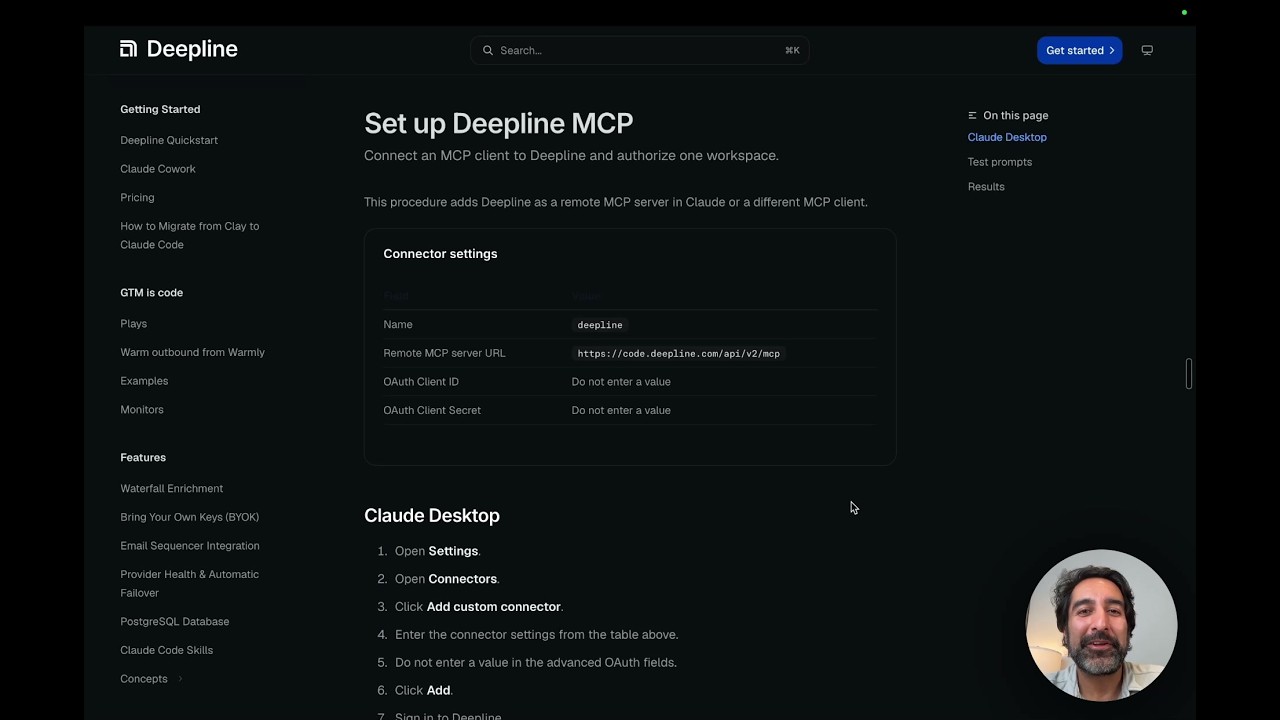
Deepline now ships a remote MCP server. Point a connector at https://code.deepline.com/api/v2/mcp, leave the OAuth client ID and secret blank, and authorize one workspace. The Deepline server does the OAuth exchange. Your agent gets the provider catalog as typed tools.
The walkthrough shows the full path in ChatGPT Work: connect the server, authorize a workspace, find contact data, check its source, update HubSpot, and call a saved Play. Keep the MCP setup guide open while you connect it. The video guide includes the exact prompts and workspace boundary.
This is the path we recommend for agents that speak MCP. There is no binary to install and no credential file to manage. Arguments get validated before a call goes out. It works in runtimes with no shell at all.
The server exposes a focused set of operations rather than every tool in the catalog. We did that on purpose to keep the context cost down, which is why connecting it does not eat your context window.
Why the TypeScript SDK is the second wave
The next thing we are shipping is an auto-generated TypeScript SDK — every tool, every payload, every result type, fully typed and JSDoc-documented. Run deepline gen types typescript (planned), get a .ts file with the entire Deepline surface area. Save it into your repo. Now the agent has IDE autocomplete and inline docs for every Deepline call, with compile-time errors before the first runtime credit is spent.
The Supabase pattern proves this works at scale. Once the types are in the codebase, the agent stops guessing — and the cost of switching providers becomes real architectural work, not a one-line change. That is what we want for the agent-generated app code path.
What this means for you
Pick the interface your agent already speaks.
If it speaks MCP, like Claude Desktop or a ChatGPT connector, add the MCP server. Nothing to install, and you get to a working enrichment call fast.
If it has a shell and you want to pipe results into other commands or commit a workflow to your repo, use the CLI. If you are generating application code that runs in production later, use the typed SDK.
All of them run the same waterfall against the same providers and return the same fields. Pick whichever one your agent already speaks. You get the same data either way.
Install in 30 seconds:
npm install -g deepline@latest && npm exec --yes --package=deepline@latest -- deepline setup --json
Then run a waterfall. Tell your agent what you want in plain English. Read the result.
That is the whole pitch.
Frequently asked questions
Does Deepline have an MCP server?
Yes. Deepline ships a remote MCP server at https://code.deepline.com/api/v2/mcp. Add it as a connector in Claude or any MCP-capable client, authorize the workspace over OAuth, and your agent can call the provider catalog as typed tools. Setup instructions are in the MCP docs.
Should I use the MCP server or the CLI? Use MCP when your agent speaks MCP. Claude Desktop, ChatGPT connectors, and embedded copilots all connect this way, and typed tool definitions give the agent argument validation for free. Use the CLI when your agent has a shell and you want to pipe results into other commands or commit a workflow to your repo. Both run the same waterfall logic against the same providers.
How do I connect Deepline to Claude Desktop?
Add a connector pointing at https://code.deepline.com/api/v2/mcp. Leave the OAuth client ID and secret blank, because the Deepline server does the OAuth exchange. You authorize one workspace during setup. Full walkthrough in the MCP docs.
When should I use the TypeScript SDK instead of the CLI? Use the SDK when an agent is generating application code that will run later in production. Auto-generated TypeScript types provide IDE autocomplete and JSDoc inline documentation that catch errors at compile time. Use the CLI for exploratory shell work, ad-hoc enrichment, and workflow scripts.
Why does Deepline ship CLI, SDK, MCP, AND REST? Each interface serves a different runtime. MCP for agents that speak the protocol. CLI for agents with a shell. SDK for app developers generating production code. REST for direct integrations with existing services. All four share identical semantics: the same waterfall returns the same fields no matter how you called it.
How much does Deepline cost? Bring Your Own Key (BYOK) uses customer-owned provider accounts without Deepline managed-provider charges. Managed-provider calls use the Deepline credit rates and charging rules in the current action contract. See pricing.
What if I am not using a coding agent yet? The CLI works standalone. You can run Deepline from any terminal — no Claude Code, no Cursor, no agent required. Most teams adopt the CLI first and add an agent later when they want plain-English workflow definition.