

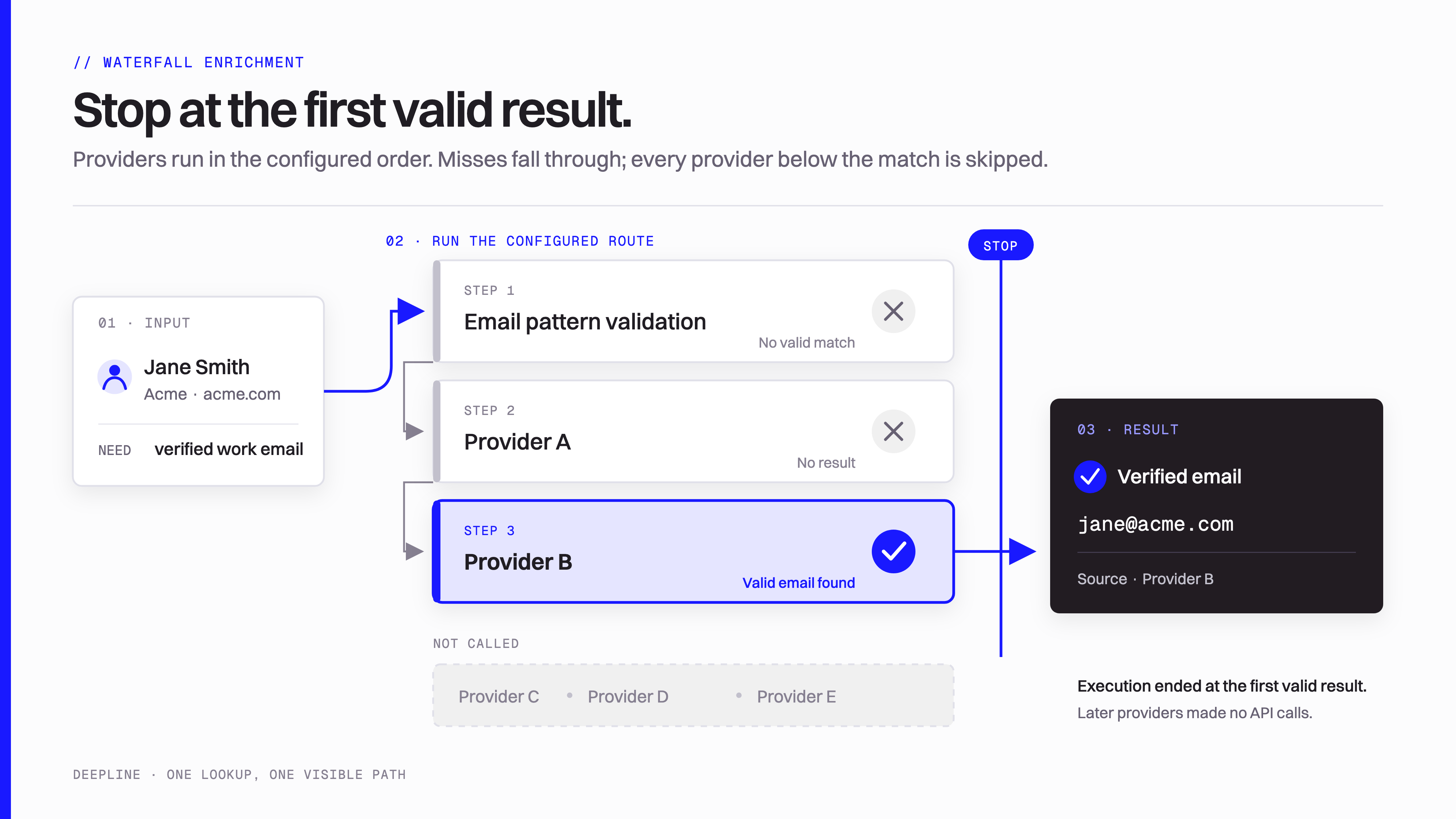
The Play evaluates each candidate. An accepted result ends the search for that record.
Sources and acceptance rules
A provider response is evidence for a decision. It can contain no match, a candidate, a conflicting identity, or an execution error. The Play decides whether that evidence meets the result it promises. For email enrichment, finding an address and verifying it are separate operations. The result must also belong to the intended person under your acceptance rule. An email validation status alone does not establish current employment or guarantee delivery. A maintained email waterfall can retain the selected address, source, validation outcome, miss reason, and provider attempts. These fields explain which path produced the result and why a record remains unresolved. The exact fields come from the selected Play’s contract.Provider order and fallback
Suppose a Play tries three sources for each contact. If the first source produces an accepted result, the Play skips later sources for that contact. If it produces no suitable candidate, the next source receives that unresolved case. Order affects coverage, latency, and usage. Known profile URLs can follow a different path from names with ambiguous company matches. Some Plays also prefer particular sources or require additional validation before stopping. A no-match result means that the completed lookup did not establish the requested fact. An error means that an operation failed. A Play can define fallback for particular recoverable errors, but an access or billing failure is not evidence of poor coverage.Prebuilt and custom waterfalls
Deepline maintains prebuilt Plays for common enrichment tasks. Their contracts define the identifiers they accept, the result they return, and any CSV column mappings. The Play owns its source sequence and acceptance logic. A custom Play is useful when you need another rule, provider order, transformation, or destination. It can compose supported scalar prebuilt Plays and call individual tools. When you need a particular provider’s complete response for comparison, call that tool directly. A CSV-capable waterfall applies its logic to each row in one dataset. The run retains output and failure evidence so you can review accepted, unresolved, and failed records separately. Exporting that saved result does not repeat the lookup.Usage and reuse
Usage follows the operations that ran. A later source can add a result while earlier lookups and validation still contribute charges. Some operations charge per request, even when they return no accepted match. Managed access uses the applicable Deepline pricing. With Bring Your Own Key (BYOK), your provider account has its own billing terms. The Pricing and credits page explains how these modes relate. Completed work can be reused when its freshness and execution contracts permit it. A new or deliberately refreshed lookup can perform provider work again. Reuse and stopping after acceptance are separate mechanisms.Coverage comparison
Compare two routes on the same dated records and acceptance rule. Retain the result categories: accepted, rejected, unresolved, and failed. An authorization failure cannot establish a source’s match rate. A fallback’s contribution is the additional accepted records it finds among the remaining unresolved inputs. Finding another copy of an already accepted result adds no coverage. Compare that additional coverage with the extra recorded usage, rather than comparing raw match counts alone.Related features and guides
- Tools: the individual operations a waterfall calls.
- Plays: custom logic and composition.
- Find work emails: the practical lookup and CSV procedure.
- Cost control: recorded usage per accepted result and future spending limits.