> ## Documentation Index
> Fetch the complete documentation index at: https://deepline.com/docs/llms.txt
> Use this file to discover all available pages before exploring further.
# Warm outbound from Warmly
> Send Warmly website-visitor events to Deepline, qualify each person, and route approved leads to your CRM or outbound campaign.
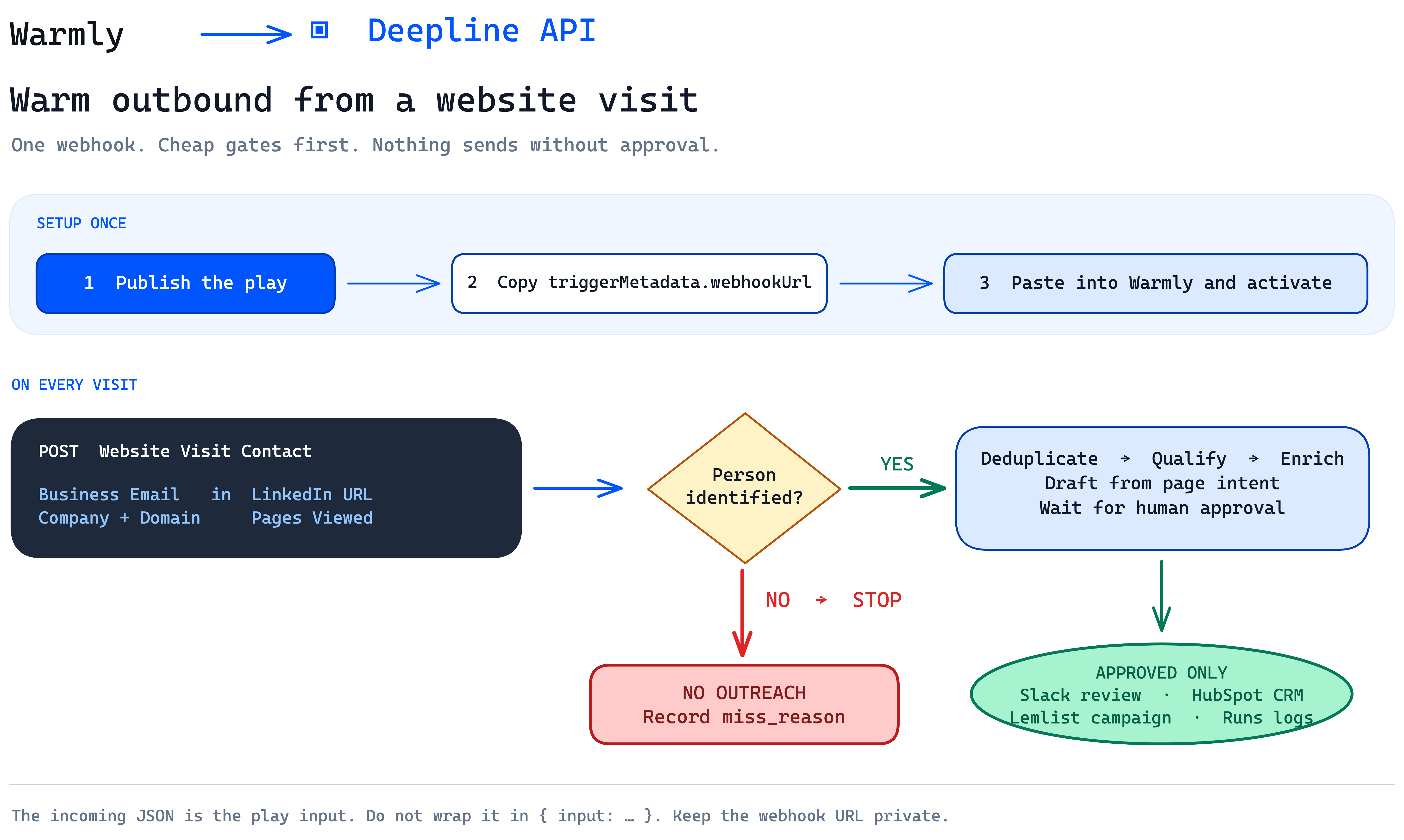
Use this recipe to turn a Warmly **Website Visit Contact** event into a reviewed outbound lead.
 ## Build the play
Give this prompt to your coding agent with the `deepline-gtm` skill installed:
```text theme={null}
Build a Deepline play named `warmly_warm_outbound`.
- Trigger it with `webhook: {}`.
- Accept Warmly's raw Website Visit Contact JSON as the play input.
- Normalize Business Email, LinkedIn URL, Company Name, Website,
Title, Session ID, Seen At, and Pages Viewed.
- Stop company-only events with status=skipped and a miss_reason.
- Deduplicate by session, LinkedIn URL, email, and campaign membership.
- Apply deterministic ICP rules before AI or paid enrichment.
- Find and validate a work email only after the visitor passes.
- Draft a short opener from the pages viewed.
- Send the lead to human review.
- Only after approval, write to the CRM or outbound campaign.
Keep stable step IDs. Return status, miss_reason, evidence, and activation results.
Never auto-send.
```
You can also fork the [Vector Warm Outbound play](https://deepline.com/p/jai-toor-s-workspace/vector-warm-outbound) and replace its input mapping with the Warmly fields above.
## 1. Publish and copy the webhook URL
```bash theme={null}
deepline plays check ./warmly-warm-outbound.play.ts
deepline plays publish ./warmly-warm-outbound.play.ts --json
```
Copy `triggerMetadata.webhookUrl` from the publish response. You can also open the live play, select **Webhook**, and copy the URL there.
## Build the play
Give this prompt to your coding agent with the `deepline-gtm` skill installed:
```text theme={null}
Build a Deepline play named `warmly_warm_outbound`.
- Trigger it with `webhook: {}`.
- Accept Warmly's raw Website Visit Contact JSON as the play input.
- Normalize Business Email, LinkedIn URL, Company Name, Website,
Title, Session ID, Seen At, and Pages Viewed.
- Stop company-only events with status=skipped and a miss_reason.
- Deduplicate by session, LinkedIn URL, email, and campaign membership.
- Apply deterministic ICP rules before AI or paid enrichment.
- Find and validate a work email only after the visitor passes.
- Draft a short opener from the pages viewed.
- Send the lead to human review.
- Only after approval, write to the CRM or outbound campaign.
Keep stable step IDs. Return status, miss_reason, evidence, and activation results.
Never auto-send.
```
You can also fork the [Vector Warm Outbound play](https://deepline.com/p/jai-toor-s-workspace/vector-warm-outbound) and replace its input mapping with the Warmly fields above.
## 1. Publish and copy the webhook URL
```bash theme={null}
deepline plays check ./warmly-warm-outbound.play.ts
deepline plays publish ./warmly-warm-outbound.play.ts --json
```
Copy `triggerMetadata.webhookUrl` from the publish response. You can also open the live play, select **Webhook**, and copy the URL there.
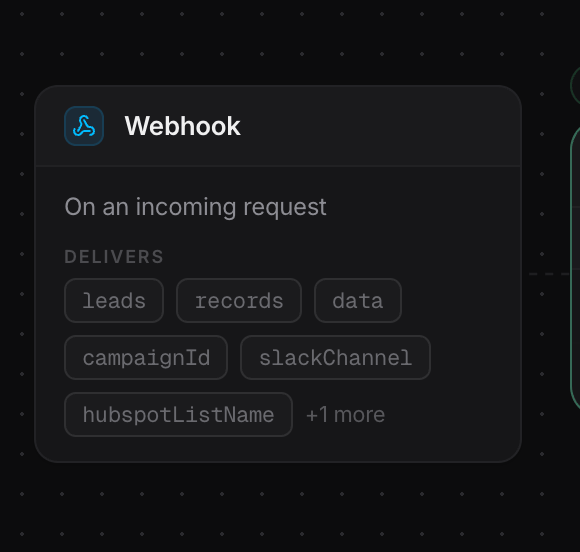 The URL only exists for a live play with `webhook: {}`. Treat its inbound
token like a secret.
## 2. Paste the URL into Warmly
Open **Settings > Webhooks**, paste the full Deepline `https://` URL, and save.
In **Orchestrator**, choose **Website Visit Contact**, apply your audience filters, add **Send Contact to Webhook**, paste the Deepline URL, and activate the orchestration.
Use **Send Company to Webhook** only when the play is designed for company-level events. See [Warmly's webhook guide](https://help.warmly.ai/articles/7839413626-setting-up-webhooks) for the current setup paths and payload schema.
## 3. Map the fields once
| Warmly field | Play field |
| ------------------------- | ---------------------- |
| `Business Email` | `email` |
| `LinkedIn URL` | `linkedin` |
| `First Name`, `Last Name` | `first`, `last` |
| `Company Name`, `Website` | `company`, `domain` |
| `Title`, `Industry` | `title`, `industry` |
| `Session ID`, `Seen At` | deduplication identity |
| `Pages Viewed Details` | page-intent evidence |
Warmly posts the object directly. Do not wrap it in `{ "input": ... }`.
## 4. Test and inspect one event
Send one Warmly test event, then inspect the Deepline run:
```bash theme={null}
deepline runs list --play warmly_warm_outbound --json
deepline runs get --full --json
deepline runs logs --limit 200 --json
```
An expected run reads like this:
```text theme={null}
[normalize] Website Visit Contact → person@example.com
[dedupe] new person
[icp] passed
[email] deliverable
[review] waiting for approval
```
The red path is terminal: **NO means no outreach**. Record `status=skipped` and `miss_reason`, then stop. Only the green path can reach Slack review, HubSpot, or the campaign.
## Final checks
* The play is live and shows a Webhook node.
* Warmly sends a contact-level event to the full `https://` URL.
* Repeated events do not repeat paid work or activation.
* Every stopped event has a `miss_reason`.
* CRM and campaign writes require approval.
* Runs and logs show the final decision.
***
Related: [Webhooks and schedules](/docs/sdk-v2/webhooks-and-schedules) | [Research workflows](/docs/plays/research-workflow)
The URL only exists for a live play with `webhook: {}`. Treat its inbound
token like a secret.
## 2. Paste the URL into Warmly
Open **Settings > Webhooks**, paste the full Deepline `https://` URL, and save.
In **Orchestrator**, choose **Website Visit Contact**, apply your audience filters, add **Send Contact to Webhook**, paste the Deepline URL, and activate the orchestration.
Use **Send Company to Webhook** only when the play is designed for company-level events. See [Warmly's webhook guide](https://help.warmly.ai/articles/7839413626-setting-up-webhooks) for the current setup paths and payload schema.
## 3. Map the fields once
| Warmly field | Play field |
| ------------------------- | ---------------------- |
| `Business Email` | `email` |
| `LinkedIn URL` | `linkedin` |
| `First Name`, `Last Name` | `first`, `last` |
| `Company Name`, `Website` | `company`, `domain` |
| `Title`, `Industry` | `title`, `industry` |
| `Session ID`, `Seen At` | deduplication identity |
| `Pages Viewed Details` | page-intent evidence |
Warmly posts the object directly. Do not wrap it in `{ "input": ... }`.
## 4. Test and inspect one event
Send one Warmly test event, then inspect the Deepline run:
```bash theme={null}
deepline runs list --play warmly_warm_outbound --json
deepline runs get --full --json
deepline runs logs --limit 200 --json
```
An expected run reads like this:
```text theme={null}
[normalize] Website Visit Contact → person@example.com
[dedupe] new person
[icp] passed
[email] deliverable
[review] waiting for approval
```
The red path is terminal: **NO means no outreach**. Record `status=skipped` and `miss_reason`, then stop. Only the green path can reach Slack review, HubSpot, or the campaign.
## Final checks
* The play is live and shows a Webhook node.
* Warmly sends a contact-level event to the full `https://` URL.
* Repeated events do not repeat paid work or activation.
* Every stopped event has a `miss_reason`.
* CRM and campaign writes require approval.
* Runs and logs show the final decision.
***
Related: [Webhooks and schedules](/docs/sdk-v2/webhooks-and-schedules) | [Research workflows](/docs/plays/research-workflow)