> ## Documentation Index
> Fetch the complete documentation index at: https://deepline.com/docs/llms.txt
> Use this file to discover all available pages before exploring further.
# Databricks API Guide for GTM Workflows
> Prefer semantic queries when a Databricks semantic layer is configured. Use direct SQL only for explicit read-only SQL requests; mutating SQL is unsupported.
## Playbook
# Databricks guidance
Use `databricks_get_semantic_layer` before choosing semantic table, metric, dimension, or filter names. Prefer `databricks_run_semantic_query` for governed analytics and `databricks_run_query` only when the user supplies SQL or explicitly needs SQL-level control.
When the customer already governs business measures in a Unity Catalog Metric View, use `databricks_import_metric_view` with its default preview mode. Review the generated YAML before using `save: true`. Metric View measures are mapped to Databricks `MEASURE(...)` expressions; parameterized Metric Views must be queried directly as table-valued functions.
Direct queries are read-only. Mutating SQL is unsupported because Statement Execution has no submission idempotency key. Use Databricks named parameter markers (`:customer_id`) with `parameters`; never interpolate untrusted values into SQL.
Results are bounded and may be truncated. For large downstream datasets, use the Play dataset path, which performs count and page queries without loading the full result into agent context.
## Connect Databricks
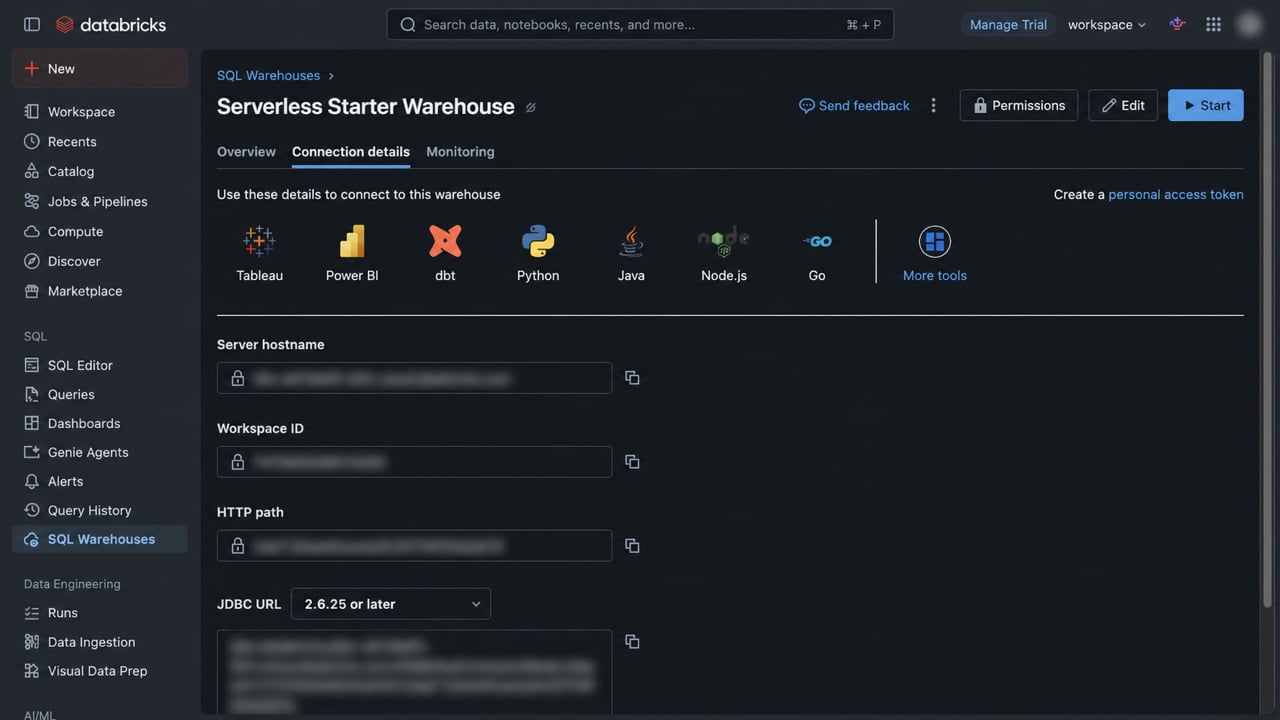
In Databricks, open **SQL Warehouses**, select the warehouse Deepline should use, and open **Connection details**. Map the values into Deepline as follows:
 | Databricks value | Deepline field | What to enter |
| --------------------- | ------------------------------ | --------------------------------------------------------------------------------- |
| Server hostname | Workspace URL | Prefix the hostname with `https://`. Do not include a path. |
| HTTP path | SQL warehouse ID | Enter only the value after `/sql/1.0/warehouses/`. |
| Personal access token | Personal access or OAuth token | Paste the token once. Deepline stores it as a secret. |
| Catalog | Default catalog | Optional. Use the Unity Catalog catalog that contains the governed data. |
| Schema | Default schema | Optional. Use the schema Deepline should resolve unqualified table names against. |
Workspace ID, JDBC URL, and the displayed OAuth URL are not required for a token connection. For production automation, prefer a Databricks service principal with OAuth M2M credentials and least-privilege `CAN USE` access to the SQL warehouse plus the required Unity Catalog grants. Do not enter both a token and OAuth client credentials.
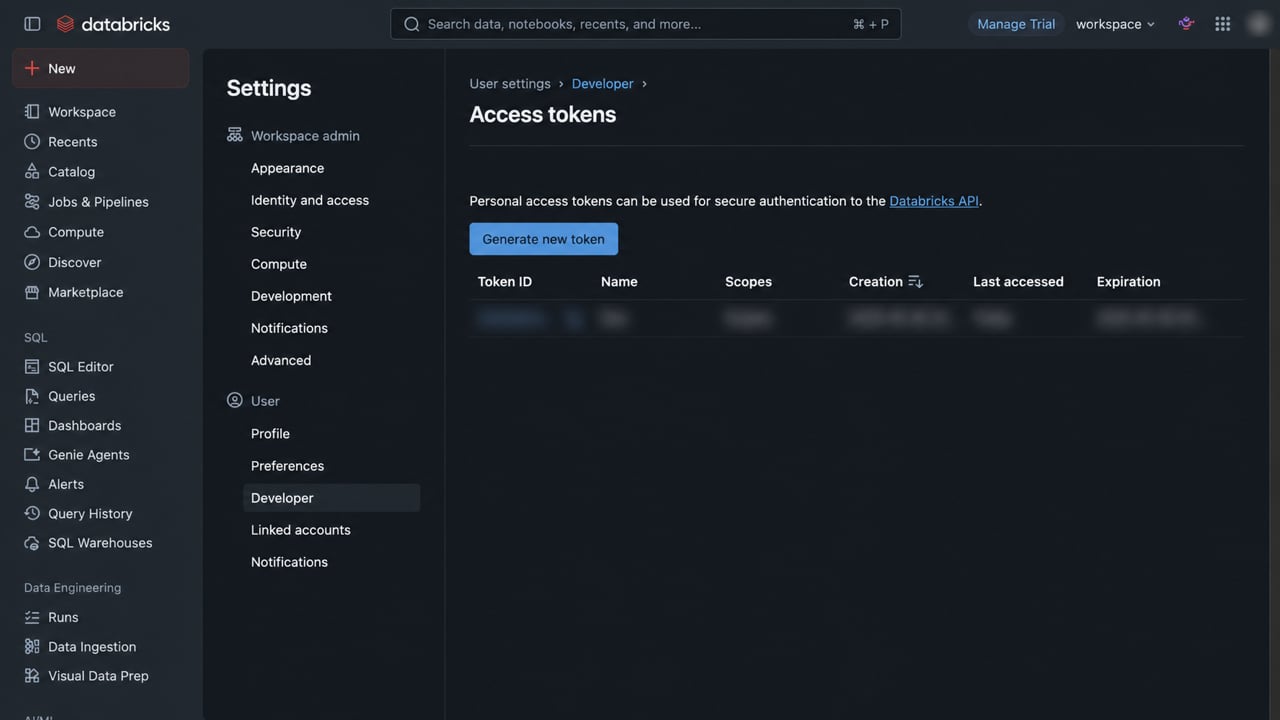
For PAT authentication, open **Settings → Developer → Access tokens** and select **Generate new token**. Copy the token when Databricks shows it; the value is displayed only during creation.
| Databricks value | Deepline field | What to enter |
| --------------------- | ------------------------------ | --------------------------------------------------------------------------------- |
| Server hostname | Workspace URL | Prefix the hostname with `https://`. Do not include a path. |
| HTTP path | SQL warehouse ID | Enter only the value after `/sql/1.0/warehouses/`. |
| Personal access token | Personal access or OAuth token | Paste the token once. Deepline stores it as a secret. |
| Catalog | Default catalog | Optional. Use the Unity Catalog catalog that contains the governed data. |
| Schema | Default schema | Optional. Use the schema Deepline should resolve unqualified table names against. |
Workspace ID, JDBC URL, and the displayed OAuth URL are not required for a token connection. For production automation, prefer a Databricks service principal with OAuth M2M credentials and least-privilege `CAN USE` access to the SQL warehouse plus the required Unity Catalog grants. Do not enter both a token and OAuth client credentials.
For PAT authentication, open **Settings → Developer → Access tokens** and select **Generate new token**. Copy the token when Databricks shows it; the value is displayed only during creation.
 After saving, use **Test** in the Deepline integration row. A successful test returns the Databricks user, current catalog, and current schema used for subsequent queries.
Databricks references:
* [SQL warehouse connection details](https://docs.databricks.com/aws/en/integrations/compute-details)
* [Create a personal access token](https://docs.databricks.com/aws/en/dev-tools/auth/pat)
* [Authorize a service principal with OAuth M2M](https://docs.databricks.com/aws/en/dev-tools/auth/oauth-m2m)
After saving, use **Test** in the Deepline integration row. A successful test returns the Databricks user, current catalog, and current schema used for subsequent queries.
Databricks references:
* [SQL warehouse connection details](https://docs.databricks.com/aws/en/integrations/compute-details)
* [Create a personal access token](https://docs.databricks.com/aws/en/dev-tools/auth/pat)
* [Authorize a service principal with OAuth M2M](https://docs.databricks.com/aws/en/dev-tools/auth/oauth-m2m)