> ## Documentation Index
> Fetch the complete documentation index at: https://deepline.com/docs/llms.txt
> Use this file to discover all available pages before exploring further.
# Where data lives
> Use a CSV for a small pilot, Customer DB for durable working state, and your CRM for approved operational records.
Start a new idea in a CSV. Move it to Customer DB when the work needs durable
state. Write to the CRM only when a person or process should act on the result.
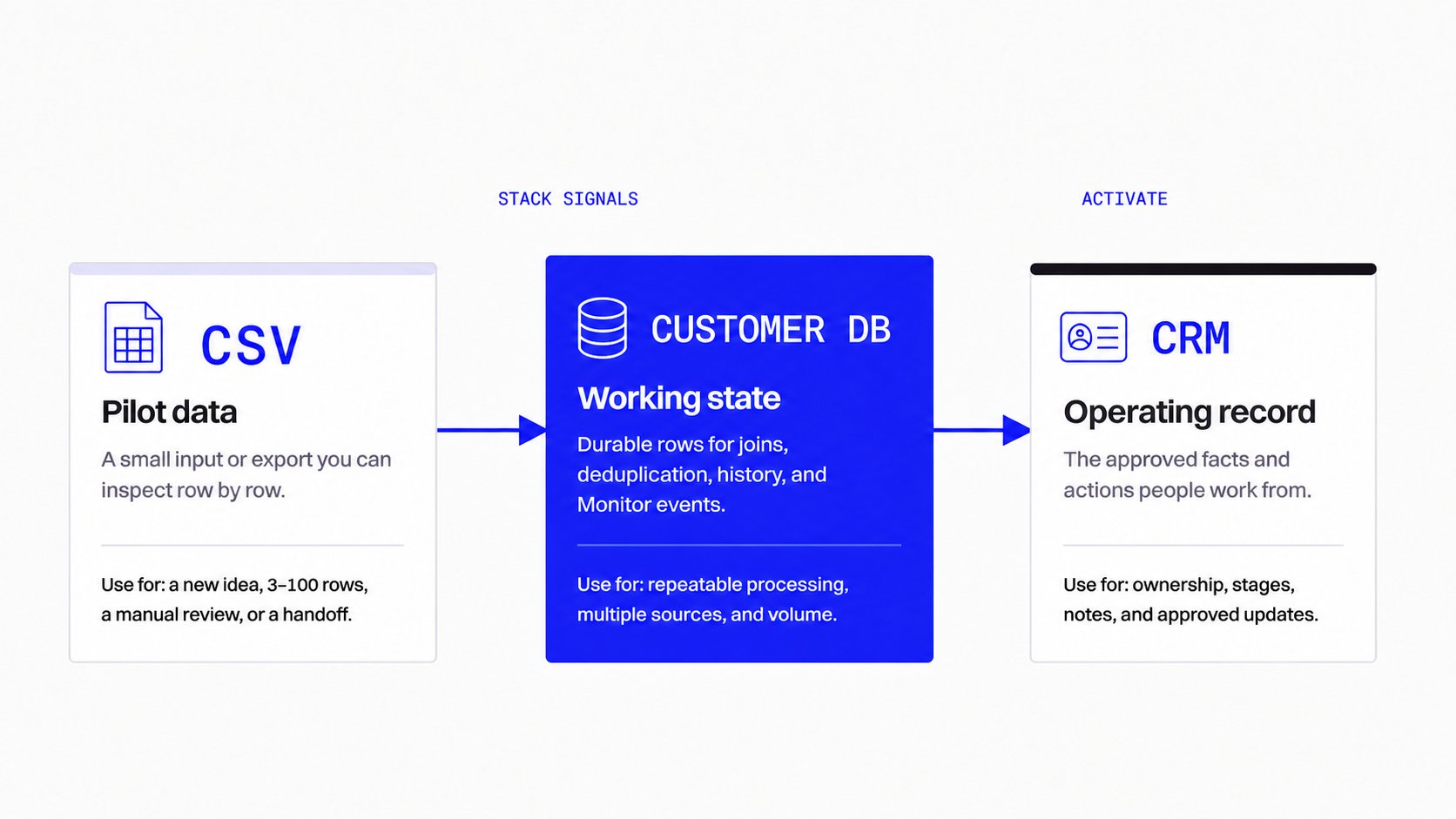 ## Choose the right home
| Use | CSV | Customer DB | CRM |
| ----------------- | ------------------------------------------------- | ---------------------------------------------------------------------- | -------------------------------------------------------- |
| Best for | A small, inspectable pilot | Durable working data | Approved operating records |
| Start here when | You are testing a new idea or have a handoff file | You need joins, history, deduplication, or Monitor events | A rep, owner, or customer process needs the result |
| Keep here | Input rows, pilot output, and review notes | Raw signals, intermediate rows, evaluation results, and reusable state | Ownership, stages, approved facts, and follow-up actions |
| Do not use it for | Long-lived state or multi-step joins | Your team’s day-to-day pipeline management | Enrichment scratch data or unreviewed events |
## Start with a CSV
Use a CSV for a first run: a new ICP, a small list, a one-time research job, or
a file someone needs to inspect. It makes input and output concrete before you
automate anything.
```text theme={null}
/deepline-gtm Use this 20-row CSV to test the account criteria. Add a match reason and evidence for each row. Do not update the CRM yet.
```
Keep the pilot small. Review the matched and unresolved rows. Once the rules
are credible, move the work into a Play and Customer DB.
## Use Customer DB for working state
Customer DB is the durable staging layer for code running in Deepline. Use it
when a process has more than one source, needs a SQL join, must deduplicate
records, receives Monitor events, or must remember what happened in an earlier
run.
Examples:
* A Monitor writes job-change events; a Play joins them to existing people and
accounts before deciding whether to notify a rep.
* A Play stores enrichment results and avoids paying again for the same lookup.
* A research workflow compares several sources before producing an approved
audience or CRM update.
Use [`query_customer_db`](/docs/database-access) for bounded agent SQL reads and
`storage.*` tables. Do not use the CRM as a scratch database.
## Write the result to your CRM
The CRM is the operating record: what the team owns, works, and reports on.
Write a result there after the rule and fields are clear.
Before an automated CRM write, define:
1. The fields the Play may change.
2. The evidence or quality gate required for a change.
3. The action for an ambiguous row: review, skip, or create a task.
4. Whether a person must approve the update in Slack or another review step.
Do not overwrite CRM fields from an unreviewed enrichment result. Keep the
source evidence and the prior value available for review.
## Common questions from office hours
### Should I start in Customer DB or a CSV?
Start in a CSV when you are proving a rule or reviewing a small list. Start in
Customer DB when the work already needs durable state, volume, joins, or a
Monitor. You can import the tested CSV into Customer DB later; do not build a
large process around passing files between agents.
### Does a Monitor replace a job-change check?
No. Use a Monitor when a supported external source pushes ongoing changes into
Deepline. Use a job-change check when you want to inspect an existing list now.
See [Job changes and CRM cleanup](/docs/plays/play-job-change-alerts) and
[Monitors](/docs/plays/monitors).
### What makes matching reliable enough for a CRM update?
Use stable input whenever possible. A LinkedIn URL is stronger than a name and
company alone. Treat a company-name mismatch as a lead, not proof; keep the
profile or domain evidence with the proposed update.
### How do I avoid a large, brittle Play?
Make the first Play do one useful job. Add an explicit quality check between
source, enrichment, and CRM write. A failed or ambiguous row should have a
defined output, rather than falling through to an update.
See the supported SQL access paths and the `storage.*` write boundary.
## Choose the right home
| Use | CSV | Customer DB | CRM |
| ----------------- | ------------------------------------------------- | ---------------------------------------------------------------------- | -------------------------------------------------------- |
| Best for | A small, inspectable pilot | Durable working data | Approved operating records |
| Start here when | You are testing a new idea or have a handoff file | You need joins, history, deduplication, or Monitor events | A rep, owner, or customer process needs the result |
| Keep here | Input rows, pilot output, and review notes | Raw signals, intermediate rows, evaluation results, and reusable state | Ownership, stages, approved facts, and follow-up actions |
| Do not use it for | Long-lived state or multi-step joins | Your team’s day-to-day pipeline management | Enrichment scratch data or unreviewed events |
## Start with a CSV
Use a CSV for a first run: a new ICP, a small list, a one-time research job, or
a file someone needs to inspect. It makes input and output concrete before you
automate anything.
```text theme={null}
/deepline-gtm Use this 20-row CSV to test the account criteria. Add a match reason and evidence for each row. Do not update the CRM yet.
```
Keep the pilot small. Review the matched and unresolved rows. Once the rules
are credible, move the work into a Play and Customer DB.
## Use Customer DB for working state
Customer DB is the durable staging layer for code running in Deepline. Use it
when a process has more than one source, needs a SQL join, must deduplicate
records, receives Monitor events, or must remember what happened in an earlier
run.
Examples:
* A Monitor writes job-change events; a Play joins them to existing people and
accounts before deciding whether to notify a rep.
* A Play stores enrichment results and avoids paying again for the same lookup.
* A research workflow compares several sources before producing an approved
audience or CRM update.
Use [`query_customer_db`](/docs/database-access) for bounded agent SQL reads and
`storage.*` tables. Do not use the CRM as a scratch database.
## Write the result to your CRM
The CRM is the operating record: what the team owns, works, and reports on.
Write a result there after the rule and fields are clear.
Before an automated CRM write, define:
1. The fields the Play may change.
2. The evidence or quality gate required for a change.
3. The action for an ambiguous row: review, skip, or create a task.
4. Whether a person must approve the update in Slack or another review step.
Do not overwrite CRM fields from an unreviewed enrichment result. Keep the
source evidence and the prior value available for review.
## Common questions from office hours
### Should I start in Customer DB or a CSV?
Start in a CSV when you are proving a rule or reviewing a small list. Start in
Customer DB when the work already needs durable state, volume, joins, or a
Monitor. You can import the tested CSV into Customer DB later; do not build a
large process around passing files between agents.
### Does a Monitor replace a job-change check?
No. Use a Monitor when a supported external source pushes ongoing changes into
Deepline. Use a job-change check when you want to inspect an existing list now.
See [Job changes and CRM cleanup](/docs/plays/play-job-change-alerts) and
[Monitors](/docs/plays/monitors).
### What makes matching reliable enough for a CRM update?
Use stable input whenever possible. A LinkedIn URL is stronger than a name and
company alone. Treat a company-name mismatch as a lead, not proof; keep the
profile or domain evidence with the proposed update.
### How do I avoid a large, brittle Play?
Make the first Play do one useful job. Add an explicit quality check between
source, enrichment, and CRM write. A failed or ambiguous row should have a
defined output, rather than falling through to an update.
See the supported SQL access paths and the `storage.*` write boundary.